Customized Hotel Key Cards

Category: Uncategorized

  • Hotel Key Card Security: What’s Actually Stored and Which Chip to Specify

    Hotel Key Card Security: What’s Actually Stored and Which Chip to Specify

    Ask a front-desk manager what a hotel key card “knows” about a guest and you will often hear the same worry that has circulated since the early 2000s: that the card stores names, home addresses, or credit card numbers. It does not. The most-cited examination of this claim, a review of 100 used key cards drawn from different properties, found nothing but functional data on them, and the police warning that started the rumor was later formally retracted. What actually lives on a modern hotel key card is a short encoded identifier, and the security of your property depends far less on that data than on which chip you put it on.

    What a hotel key card actually stores

    On a well-designed system the card holds an encoded credential, typically a unique identifier tied to a room and a valid date range, and little else. The decision to open a given door is made by the lock and the access-control backend, not by the card volunteering personal details. Reputable integrators follow a simple rule: access rights should never live solely on the card. The card presents a credential, the reader authenticates it, and the property management system governs what that credential is allowed to do. That is why a lost card is a minor event rather than a data breach, and why the “your card has your identity on it” story never held up to inspection.

    The practical takeaway is that data-on-card is not your risk surface. Cloning is. A card that can be silently copied lets someone reproduce a working credential, and whether that is possible comes down entirely to the chip generation you specified the last time you reordered.

    The chip generation is the whole security story

    Hotel cards operate at one of two radio frequencies. Low-frequency 125 kHz cards and simple “UID-only” high-frequency cards carry no meaningful encryption and are trivial to duplicate; they belong on loyalty punch cards, not guest room doors. The industry standard for room access is 13.56 MHz high-frequency, and within that band the chip family matters enormously.

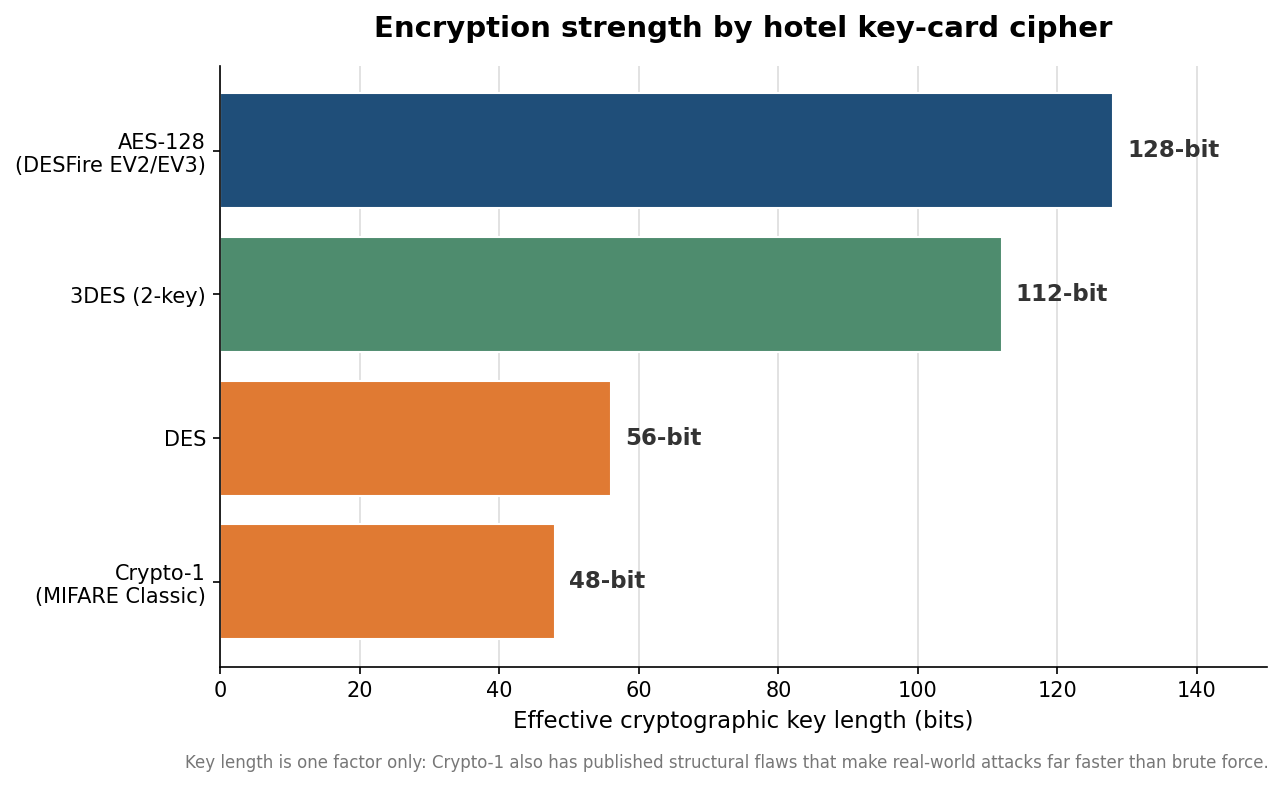
    MIFARE Classic, still shipping on huge volumes of cheap cards, relies on a proprietary cipher called Crypto-1 with a 48-bit key. Crypto-1 was reverse-engineered and publicly broken more than fifteen years ago, and the attacks have only gotten faster since. MIFARE DESFire EV2 and EV3, by contrast, use AES-128 with hardware tamper resistance and mutual authentication, meaning the card and reader each prove their identity before any data moves. MIFARE Plus in SL3 mode is a common middle path for properties upgrading in stages. The chart below shows why key length alone already tells much of the story, though it is not the only factor.
    Bar chart comparing cryptographic key length in bits for Crypto-1, DES, 3DES and AES-128 hotel key-card ciphers
    Effective key length by cipher; MIFARE Classic’s 48-bit Crypto-1 sits far below AES-128.

    The gap between a 48-bit proprietary cipher and AES-128 is not incremental. AES-128 is considered computationally unbreakable for the purposes of door access, while Crypto-1’s weaknesses are structural rather than just a matter of short keys, which is why a determined attacker does not need to brute-force anything at all.

    How cloning actually happens

    The realistic attack on a weak card is not someone reading it from across the lobby. It is brief physical proximity. Inexpensive tools that have circulated for years, from Proxmark units to consumer NFC gadgets, can read a vulnerable MIFARE Classic card in seconds when held close to it, recover the keys through well-documented cryptographic attacks, and write a working duplicate onto a blank. That is the entire threat model, and it is also why the short read range of 13.56 MHz cards is a feature rather than a limitation.
    Bar chart of typical maximum RFID read range by frequency band on a log scale, showing LF and HF near 10 cm and UHF near 6 meters
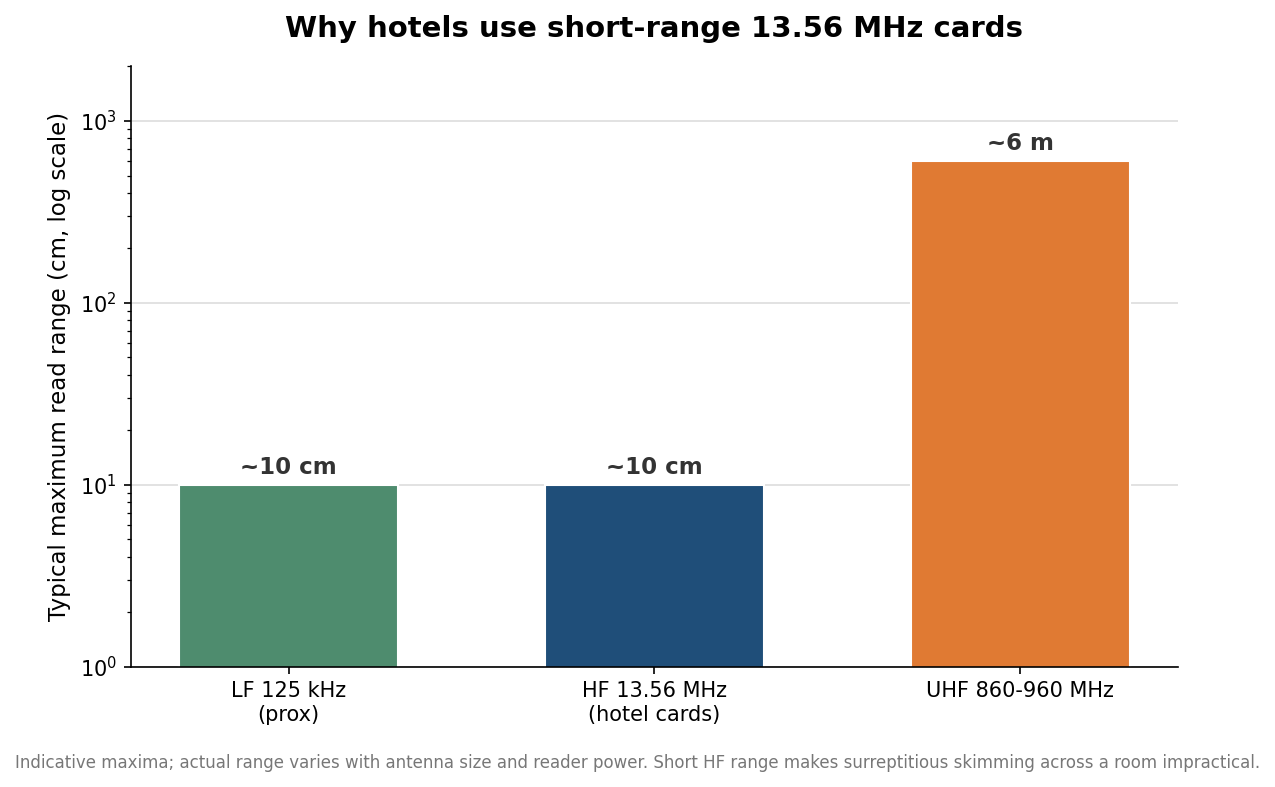
    Short 13.56 MHz read range is a deliberate security feature for room access.

    A hotel card is designed to be read only when it is almost touching the reader. That short range, on the order of a few centimeters, is deliberate: it makes surreptitious reading from a bag or a nearby seat impractical. Long-range UHF tags, which can be read from several meters, are excellent for pallet tracking and completely wrong for a guest door. If a supplier ever proposes a “convenient” long-range card for room access, treat it as a red flag.

    What to specify when you reorder

    Because the card itself is a commodity, the specification is where security is won or lost, and it costs little more to get it right. Ask for MIFARE DESFire EV2 or EV3, or MIFARE Plus in SL3 mode if your locks are not yet ready for full DESFire, and confirm the locks and encoders on your property actually support that chip before ordering in volume. Insist that each property use its own diversified keys rather than a shared factory default, so that a credential lifted at one location cannot be replayed at another. Confirm that cards are encoded at the property against your access-control system rather than pre-loaded with standing access rights. None of this changes what the guest sees; it changes whether a copied card is useful to anyone.

    On cost and lead time, expect the more secure chips to carry a modest premium. Plain printed or low-security 13.56 MHz cards often sit at the bottom of the range, while DESFire EV2/EV3 stock runs higher per unit; as an indicative figure custom encrypted RFID cards commonly fall somewhere in the region of a few tens of cents to well over a dollar each depending on chip, print, and order size, with minimums frequently in the low hundreds. Those numbers move constantly with chip supply and volume, so treat them as a planning band rather than a quote, and price the security tier you actually need rather than defaulting to the cheapest card on the shelf.

    The bottom line for operators

    The old fear was aimed at the wrong thing. Your guests’ personal data is not on the card, and never sensibly was. What is on the card is a credential whose value to a thief depends entirely on whether it can be copied, and that is a decision you make at the purchase order, not at the front desk. Specify a modern encrypted chip, use diversified keys, keep access logic in the backend, and the humble plastic rectangle stops being a security question and goes back to being a branding one.
  • How to Specify RFID Hotel Key Cards: Frequency, Chip, and Encoding

    How to Specify RFID Hotel Key Cards: Frequency, Chip, and Encoding

    Printing a hotel key card is the easy part. The artwork, the finish, the logo placement — all of that is straightforward once you have print-ready files. What trips up most first-time orders is the chip inside the card, because a beautifully printed card that the locks will not read is scrap. Getting a working card comes down to three technical decisions made in order: the radio frequency, the chip family, and how the card is encoded. Walk through them in that sequence and the cards work the day they arrive.

    Step 1: Confirm the frequency

    Contactless key cards come in two radio-frequency families, and they are not interchangeable. Low-frequency cards run at 125 kHz. These are the old proximity or “prox” cards, they carry very little data, they offer minimal security, and they are relatively easy to clone. You still see them on legacy systems and some back-of-house staff doors, but almost every modern electronic guest-room lock has moved on. High-frequency cards run at 13.56 MHz. These are true contactless smart cards: they can store encrypted data, support layered access for housekeeping, maintenance, and management, and log activity. If your property uses current electronic locks from any of the major brands, you are almost certainly on 13.56 MHz, and that is the frequency to order.

    The reason this decision comes first is that a 125 kHz card and a 13.56 MHz card are physically different antennas and chips. A reader tuned to one frequency cannot see the other at all, so guessing wrong here does not degrade performance — it produces a card that does nothing. Read the frequency off your lock system’s specification sheet or ask your lock vendor directly before you do anything else.

    Step 2: Match the chip family to your locks

    Within the 13.56 MHz family there are several chip types, and your lock system only speaks to certain ones. The common families are MIFARE Classic, MIFARE Plus, MIFARE Ultralight C, MIFARE DESFire, HID iCLASS Seos, and LEGIC. Each lock manufacturer supports a specific subset, and ordering a chip your locks do not recognize is the single most expensive mistake in a key-card order because the whole batch is unusable.

    Compatibility matrix showing which chip families Dormakaba/Saflok, Salto, Onity, and MIWA lock systems accept
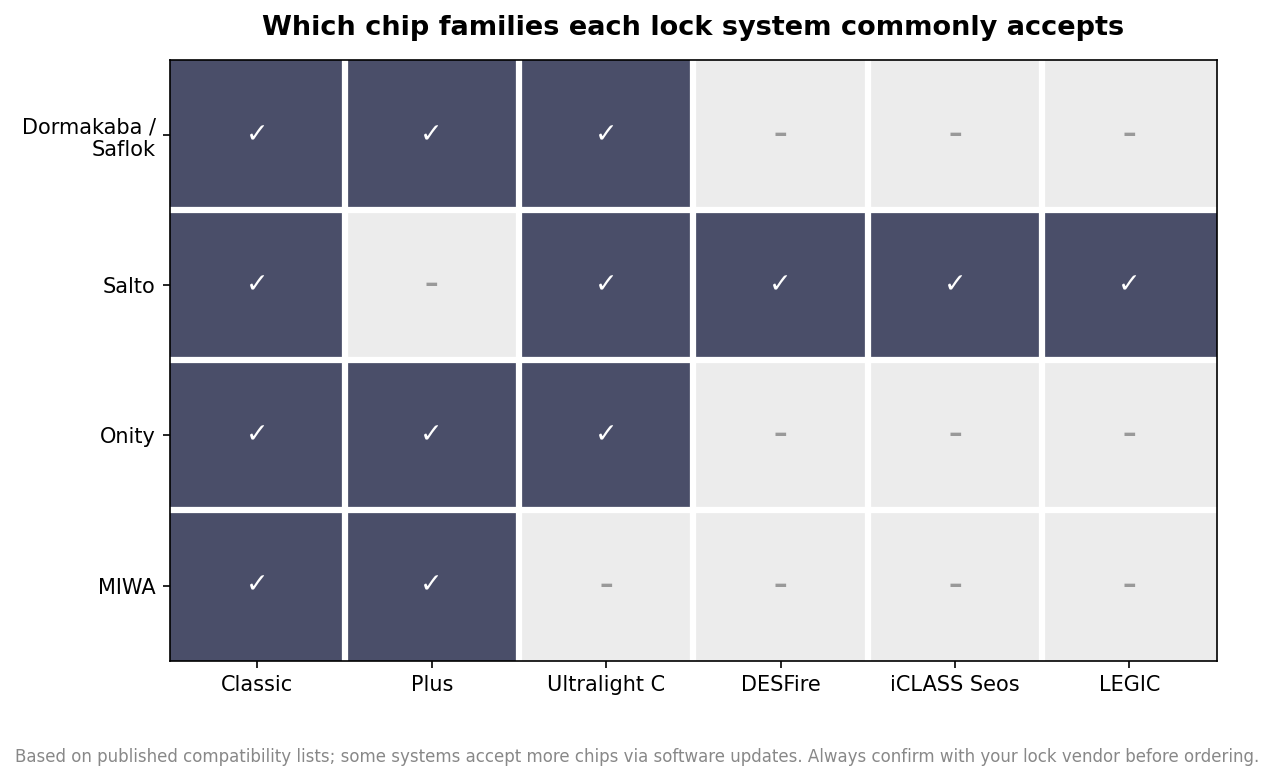
    Common chip support by lock system; confirm the exact variant with your vendor.

    The pattern above reflects published compatibility for the major systems, and a few points are worth calling out. Dormakaba and Saflok systems lean on the MIFARE Classic and Plus families plus Ultralight C. Onity covers a similar Classic-and-Plus range. Salto is the most flexible of the group, reading DESFire as its primary credential while still supporting Classic, Ultralight C, iCLASS Seos, and LEGIC. Because manufacturers add support through software updates and regional variants, treat the chart as a starting point and confirm the exact chip and variant with your lock vendor against your installed firmware before you place the order.

    Step 3: Right-size the memory and weigh security

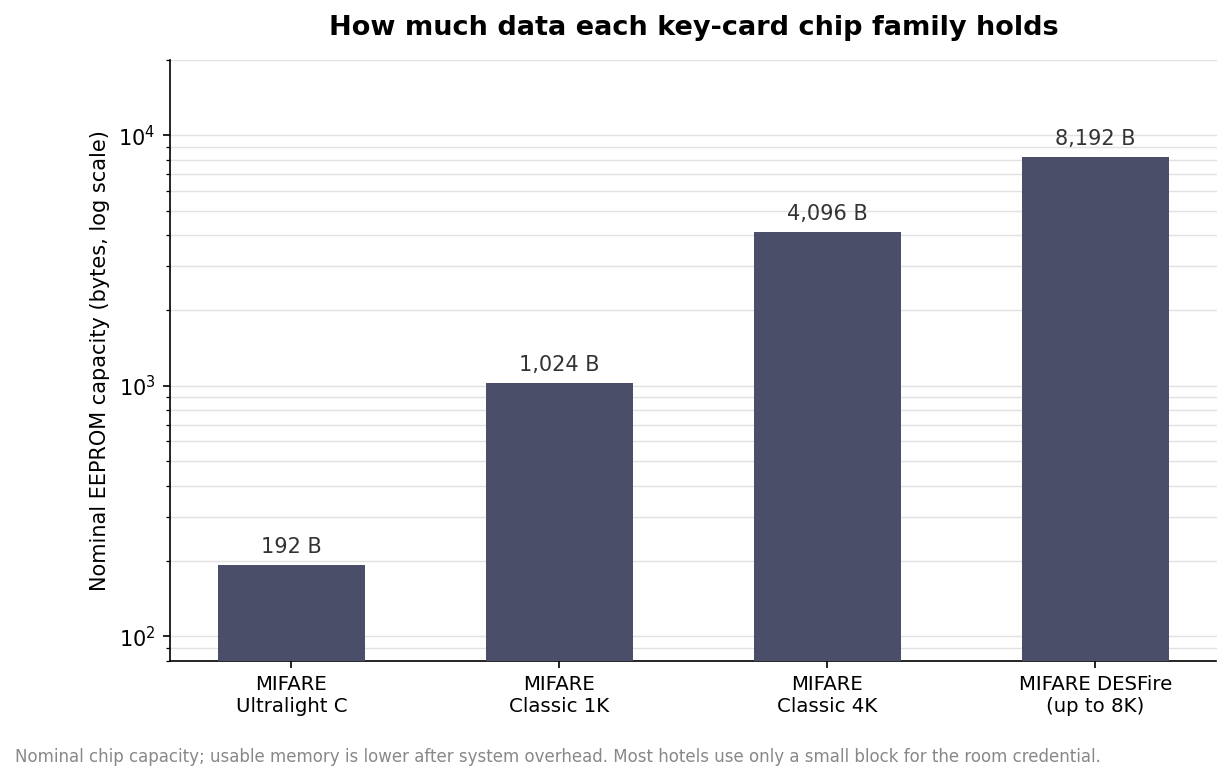
    Once you know which chips your locks accept, you often still have a choice among them, and that choice is really about memory and security rather than the room-opening function itself. A guest-room credential is tiny — a room identifier and a validity window — so raw capacity is rarely the constraint. The chart below shows how different the families are in nominal storage, but most hotels use only a small block of it.

    Log-scale bar chart of nominal memory capacity for MIFARE Ultralight C, Classic 1K, Classic 4K, and DESFire chips
    Nominal chip memory by family; a room credential uses only a small fraction.

    Security is the more meaningful axis. MIFARE Classic is inexpensive and ubiquitous, but its original Crypto1 cipher was broken years ago, and Classic cards can be cloned with cheap, widely available tools. For a standard-security property that reissues cards constantly, that may be an acceptable trade for the low price. For a high-end property, one where cards double as elevator or amenity credentials, or anywhere master-level access is a concern, a DESFire chip with AES encryption is far harder to duplicate and is worth the premium. MIFARE Ultralight C sits at the low-cost end and is a common pick for high-volume disposable cards on short stays. Decide security first, then price, because the cost difference per card is small next to the cost of a cloning incident.

    Step 4: Blank or pre-encoded

    The last decision is who writes the data to the card. In most hotels the card vendor supplies blank stock with the correct chip, and the property encodes each card at the front desk using the encoder tied to its lock software at check-in. This is what you want in nearly every case: it keeps room assignments and dates under your control, lets you reissue instantly, and means the printed card carries no guest information until your own system writes it. Pre-encoding by the vendor only makes sense for fixed-function cards, such as permanent staff or amenity credentials, and it requires sharing your system’s encoding details, so it is the exception rather than the rule.

    This also settles a common worry: a standard hotel key card does not store a guest’s name, home address, or payment details. What gets written is an access credential and the dates it is valid — a pointer your lock system understands, not a personal record. The long-running rumor that key cards hold your credit card number is simply not how the systems work.

    Putting the spec on your purchase order

    Turn those four decisions into one clear line for your supplier and your order will not bounce back with questions. Specify the frequency (almost always 13.56 MHz), the exact chip family and variant your locks require (for example, MIFARE Classic 1K, DESFire EV3, or Ultralight C), a note that cards ship blank for on-site encoding unless you have a stated reason otherwise, and then your artwork and finish. Confirm the chip against your lock vendor’s current compatibility list one last time, order a small test quantity if the chip is new to your property, and only then run the full print. Nail the chip and the encoding, and the design is the fun part again.

  • Will These Key Cards Work With Your Locks? A Compatibility Guide

    Will These Key Cards Work With Your Locks? A Compatibility Guide

    A hotel key card is only as useful as the lock it opens. Order a beautiful full-color card with the wrong chip inside and you have a stack of branded plastic that will not release a single door. Because the card has to speak the same radio language as your locks, matching the technology is the part of the order that actually determines whether the cards work — the printing is the easy part. Here is how to specify a card that your existing locks will accept, and what the real differences between card types mean for security, capacity, and cost.

    Two frequencies, and only one talks to modern locks

    Contactless key cards operate at one of two radio frequencies, and they are not interchangeable. Low-frequency 125 kHz (LF) cards use older chips such as EM or Temic and are typically found on legacy systems or as a step up from magnetic-stripe locks that are being phased out. High-frequency 13.56 MHz (HF) cards, governed by the ISO/IEC 14443 standard, are the mainstream for modern smart locks and are where the encryption and multi-application capability live. A 125 kHz card will not open a 13.56 MHz lock, and vice versa, so the first question to answer before you order anything is which frequency your locks read. If your property still swipes magnetic-stripe cards, note that magstripe is a contact technology entirely separate from both RFID frequencies, and moving to contactless usually means a lock upgrade, not just new cards.

    If you are staying on magnetic stripe for now, one spec still matters: coercivity. High-coercivity (HiCo) stripes, rated around 2,750 to 4,000 oersted, resist accidental erasure from phones, bag clasps, and other magnets far better than low-coercivity (LoCo) stripes at roughly 300 oersted, which is why hotels almost always specify HiCo despite the small added cost. It is a common and avoidable mistake to order cheap LoCo stock and then field a wave of demagnetized cards at the front desk.

    The chip inside decides security and capacity

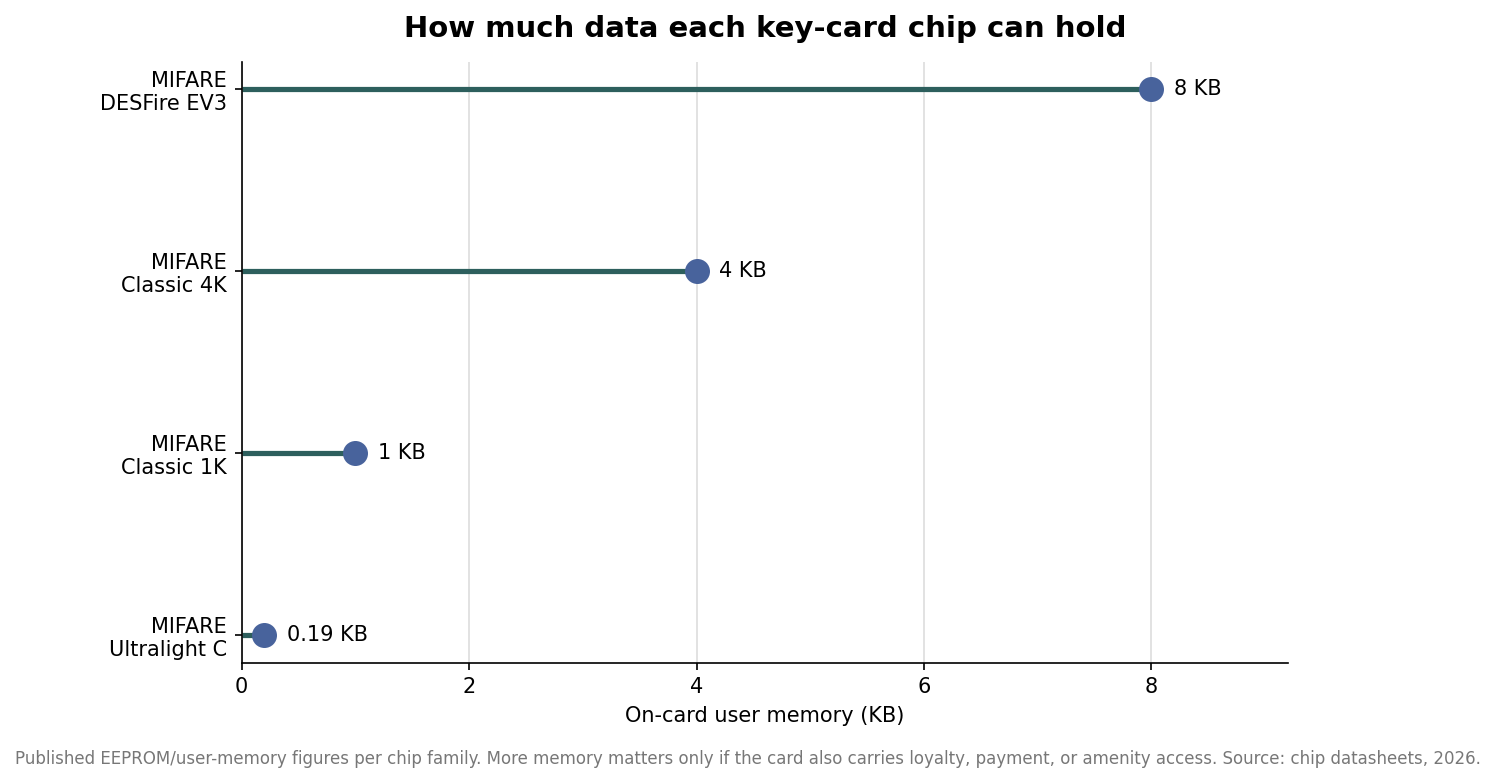
    Within the 13.56 MHz world, the specific chip matters. MIFARE Classic (1K or 4K) is the long-established workhorse and the cheapest smart option, but its original Crypto-1 cipher has well-documented security limitations, which is why security-conscious properties increasingly specify something stronger. MIFARE Ultralight C is a low-memory, low-cost chip often used for disposable or short-stay cards. MIFARE DESFire (EV1 through EV3) uses modern AES-128 encryption and is the choice for higher-security installations and for cards that do more than open a door. Memory scales with the chip too: an Ultralight C holds a couple of hundred bytes, a Classic 1K holds about a kilobyte, and a DESFire EV3 can hold up to eight, which only matters if the card also carries loyalty, payment, elevator, or amenity access.

    Lollipop chart of on-card memory in kilobytes for MIFARE Ultralight C, Classic 1K, Classic 4K, and DESFire EV3
    On-card memory by chip family; extra capacity matters only if the card carries more than door access.

    Match the card to your lock ecosystem

    Lock manufacturers each publish which chips their readers accept, and the safe path is to match your order to that list rather than to a generic “RFID card” description. Broadly, Dormakaba and Saflok systems accept MIFARE Classic (Mini, 1K, 4K), MIFARE Plus, and Ultralight C. Onity and Miwa systems similarly read MIFARE Classic, Plus, and Ultralight families. Salto offers the broadest compatibility, reading DESFire, Classic and Ultralight variants, plus non-MIFARE technologies such as HID iCLASS Seos and LEGIC. VingCard (Assa Abloy) installations are predominantly 13.56 MHz MIFARE as well. Brand names and firmware versions change what a given lock accepts, so treat these as starting points: confirm the exact chip and memory your model requires with your lock supplier, and if you are buying “compatible with Saflok/Onity” cards, verify the frequency and chip family, not just the brand label.

    What it costs, and how to order without a misfire

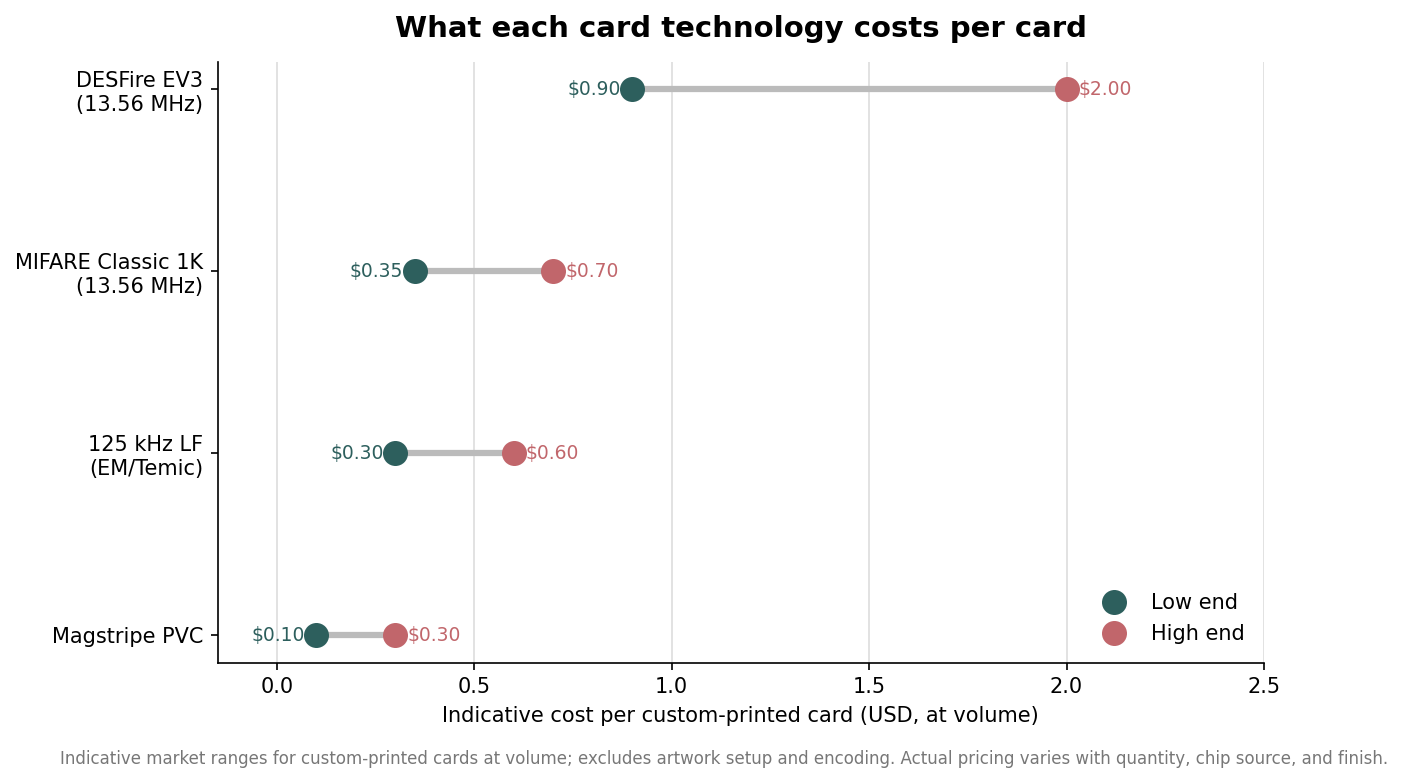
    Card technology drives most of the per-card cost. A plain magnetic-stripe PVC card is the cheapest option, low-frequency cards sit a little higher, MIFARE Classic is the affordable smart standard, and DESFire commands a real premium for its encryption. Those chip costs sit on top of the printing, which is roughly the same regardless of what is inside. There is also the encoding question: some suppliers ship blank-but-chipped cards that your property management or lock system encodes on site, while others can pre-encode to your specification — clarify which you need, because a correctly chipped card that is not encoded for your system still will not open a door on arrival. It also pays to ask how the lock reads the card: some systems key on the chip’s unique ID (UID) alone, while others write and read data in the card’s protected memory sectors. That distinction rarely changes what you order, but it determines whether cards can be re-encoded and reused for the next guest or are effectively single-assignment, which in turn changes how many you need to keep in rotation.

    Range plot of indicative low and high per-card cost for magstripe, 125 kHz LF, MIFARE Classic 1K, and DESFire EV3
    Indicative per-card cost by technology; the chip, not the printing, drives most of the difference.

    Test one card before you print a thousand

    Every hotel key card, regardless of chip, is built on the same physical standard: a CR80 card, 85.6 by 54 millimeters, 0.76 millimeters (30 mil) thick, which is why they fit every standard printer, wallet, and lock slot. That uniformity is exactly why it is easy to order the right size with the wrong insides. The single most reliable safeguard is a physical test: before committing to a full run, have your supplier send a small sample of the exact chip and encoding you intend to buy, and try it in your actual guest-room lock. If it opens the door cleanly and holds up to a few dozen taps, you have confirmed the one thing that a spec sheet cannot fully guarantee. Only then approve the artwork, the finish, and the full quantity. A single test card is a trivial cost against the alternative of a pallet of cards that greet your guests with a red light.

  • Hotel Key Card Design: How to Set Up Print-Ready Artwork

    Hotel Key Card Design: How to Set Up Print-Ready Artwork

    A hotel key card is one of the smallest pieces of print a property orders, and one of the least forgiving. It has to survive thousands of pocket-to-reader cycles, carry a magstripe or an embedded chip, and still look sharp under lobby lighting. Getting the artwork right before it goes to press is the difference between a crisp reorder and a proof round that eats a week. This guide walks through how to set up a print-ready key card file, in the order a designer actually builds it.

    Start with the canvas, not the artwork

    Every hotel key card is built on the same physical footprint: the CR80 / ID-1 format defined by ISO/IEC 7810, which measures 85.60 by 54.00 mm (3.375 by 2.125 in) with a corner radius of about 2.29 mm (0.09 in). The standard body thickness is 30 mil, which is 0.76 mm. Build your document at that exact trim size and treat it as fixed, because the card is die-cut and slotted to spec regardless of what your file says.

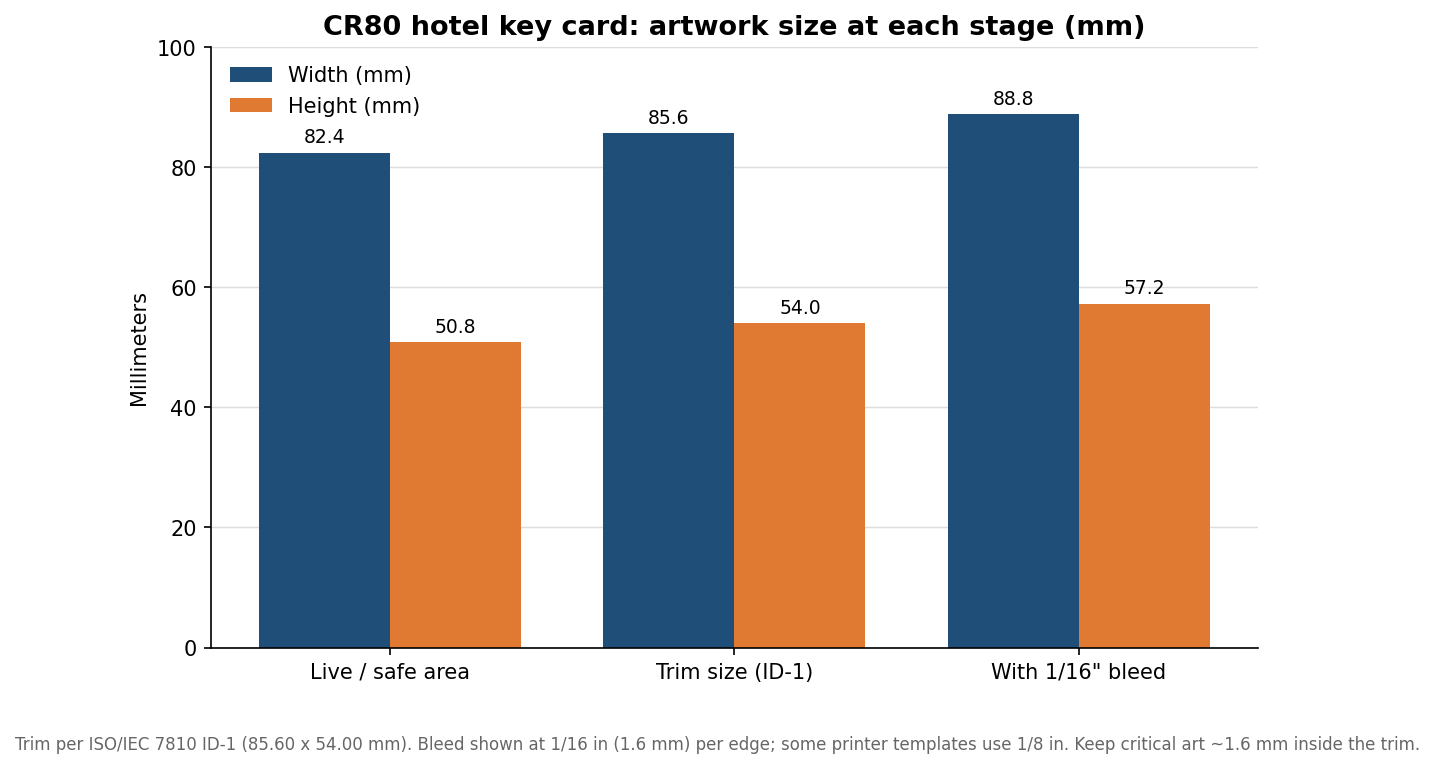
    The two measurements that trip people up are bleed and safe zone. Bleed is extra artwork extending past the trim so that no white slivers appear when the card is cut; most card printers ask for 1/16 in (about 1.6 mm) per edge, though some templates specify 1/8 in, so confirm before you export. The safe zone works in the opposite direction: keep logos, text, and anything you cannot afford to lose at least 1.6 mm inside the trim line, because die-cutting drifts by fractions of a millimeter across a run. The chart below shows the three sizes you are really designing to at once.

    Grouped bar chart of CR80 hotel key card artwork sizes: live area, ID-1 trim size, and size with 1/16-inch bleed, in millimeters
    You are designing to three sizes at once: a safe live area, the ID-1 trim, and a bleed that extends past the cut.

    Set your document up with all three guides visible from the start. A background photo or color should fill the outer bleed box, the card itself is the trim box, and your readable content lives inside the safe box. Design straight to trim with no bleed and you gamble on a perfect cut every time; there is no reason to take that bet on a five-figure card run.

    Design around the magstripe and the RFID antenna

    Encoding hardware constrains your layout, and this is where hotel cards differ from ordinary business cards. On a magnetic-stripe card, the stripe runs along the top of the back face and occupies a band roughly 9 mm tall per ISO/IEC 7811. That band is off-limits: no varnish, no heavy ink coverage, and nothing that has to be read by a human, because encoding equipment and readers need clean contact with it. Hotels almost always specify high-coercivity (HiCo) stripes rather than low-coercivity (LoCo) ones, since HiCo resists accidental erasure from phones and other cards in a guest’s wallet.

    RFID cards hide a different constraint. The chip and its antenna are laminated inside the card core, so you cannot see them, but metallic inks and metallic foil can detune or block a 13.56 MHz or 125 kHz antenna. If you want a foil-stamped logo or a metallic ink flood on an RFID card, tell your supplier up front and keep those elements away from the antenna footprint they specify. It is a common and avoidable cause of cards that print beautifully and then will not read at the door.

    Color, resolution, and files that survive the press

    Build the file in CMYK, not RGB. Screens are additive and press ink is subtractive, so a vivid RGB blue or green that looks perfect on your monitor can shift noticeably once converted at the printer. Convert deliberately yourself so you see the shift and can correct it, rather than leaving the conversion to whatever default the print shop uses. If brand consistency across signage and cards matters, specify a spot Pantone color for the logo and let the printer match it.

    Raster images should sit at 300 DPI or higher at final card size; at CR80 dimensions that is roughly 1013 by 638 pixels for a full-bleed image at 300 DPI, or double that at 600 DPI for fine detail. Save placed images in a lossless format such as TIFF or PNG, never a re-saved JPEG, because compression artifacts that are invisible on screen turn into visible mush on a glossy card. Set solid black text and fine lines to 100 percent K rather than a rich-black build, so small type stays crisp and does not show registration fringing.

    Vector art belongs in vector form. Logos, rules, and type should stay as vectors or be supplied as a layered file with fonts either embedded or outlined. Rasterizing a logo to drop it into a Photoshop file is the single most common reason a crisp mark shows soft edges on the finished card.

    Match the file to how the card is built and budgeted

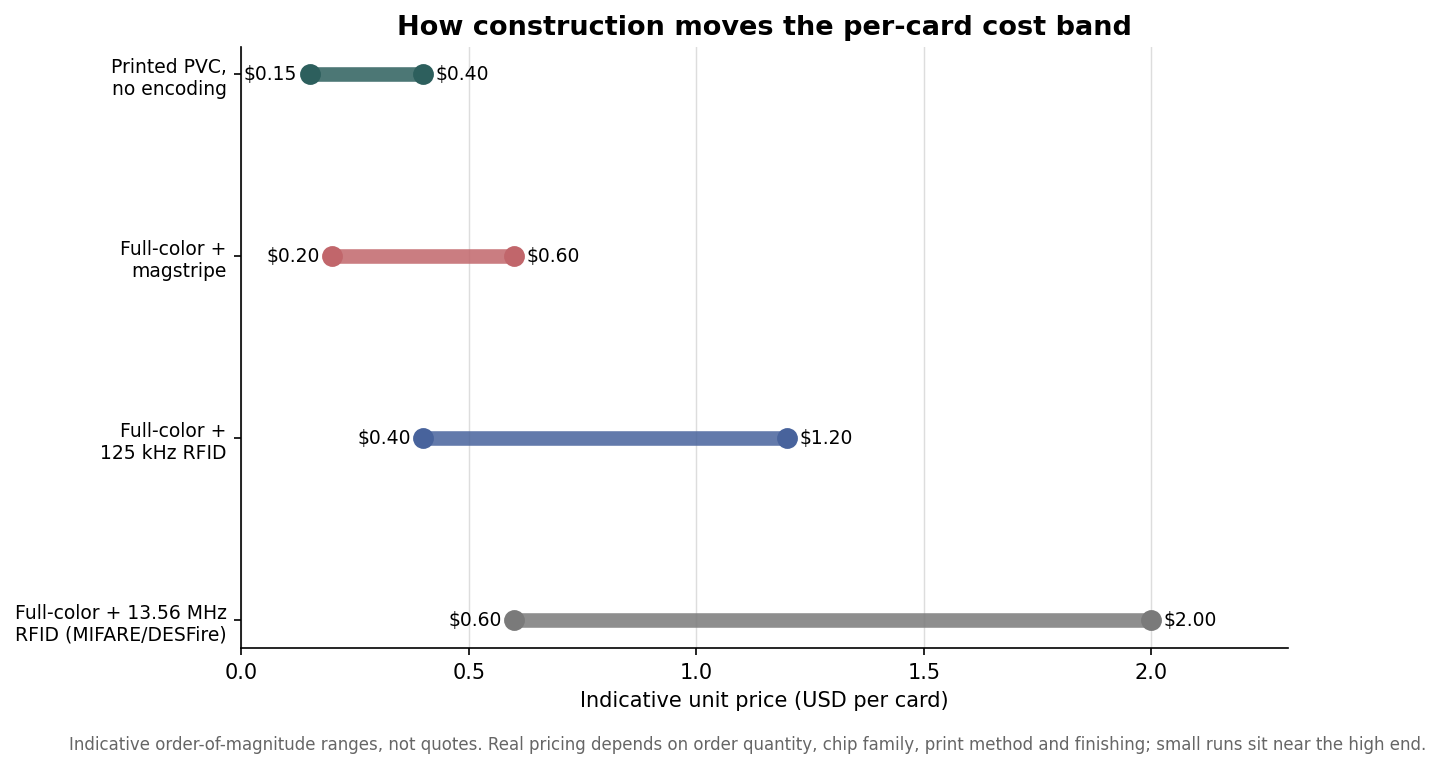
    The construction you choose changes both your file and your unit cost. A plain printed PVC card with no encoding is the cheapest and simplest to lay out. Add a magstripe and you inherit the keep-clear band. Add RFID and you inherit the antenna keep-away zone, plus a meaningful jump in price, especially for 13.56 MHz MIFARE or DESFire chips that hotel locks from brands like dormakaba, ASSA ABLOY, and Salto commonly use. The ranges below are indicative rather than quotes, but they show the shape of the trade-off.

    Range chart of indicative per-card hotel key card price by construction, from printed PVC to full-color with 13.56 MHz RFID
    Encoding drives cost: adding a magstripe or, especially, a 13.56 MHz RFID chip moves the per-card band upward.

    Quantity moves these numbers as much as construction does. Card printing has real setup cost, so small runs of a few hundred sit near the top of every band while orders in the tens of thousands fall toward the bottom. If you are reordering the same design, ask whether the printer can keep your die and encoding profile on file to avoid repeating setup.

    A short pre-flight before you send

    Before the file leaves your desk, confirm five things. The document is exactly 85.60 by 54.00 mm at trim with the bleed your printer asked for. Everything critical sits at least 1.6 mm inside the edge. The magstripe or RFID keep-clear zone is genuinely clear of foil and heavy ink. The file is CMYK with images at 300 DPI or better in a lossless format. And fonts are embedded or outlined so nothing reflows on the printer’s machine. Run that checklist and most proof rounds collapse from several back-and-forths into one clean approval, which is exactly what you want when the next step is committing to thousands of cards.

  • Foil-Stamped vs. Full-Color Printed Key Cards — Customized Hotel Key Cards

    Home › Blog › Foil-Stamped vs. Full-Color Printed Key Cards

    Buyer guides

    Foil-Stamped vs. Full-Color Printed Key Cards

    07/15/2026

    Once a property has settled on its encoding platform, the remaining decision is almost always aesthetic: does the card carry a full-color design, or a single foil-stamped mark? Both finishes hold up well under a protective overlaminate, but they age differently, cost differently at scale, and suit different logo types.

    Here is a direct comparison to help you choose, beyond the “which looks nicer” question most properties start with.

    Head-to-head comparison

    FactorFoil-StampedFull-Color Printed
    Best logo typeSimple wordmark, monogram, or iconMulti-color logos, photography, gradients
    Visual effectRaised, reflective, feels engravedFlat, photo-real, unlimited color
    Wear pattern over timeFoil can show fine scuffing on high-friction edges after extended heavy useColor fades slightly at extreme wear; overlaminate slows this significantly
    Design changes between batchesRequires a new foil die for a different markNew artwork file only, no tooling change
    Typical unit cost at 500–2,000 qtyMid to upper range of $0.45–$0.85Lower to mid range of $0.40–$0.80

    Why the “which lasts longer” question is the wrong frame

    Both finishes, properly sealed with an overlaminate, comfortably outlast the typical multi-month circulation life of a hotel key card before a scheduled reprint or redesign would replace them anyway. The more useful question is which finish ages more gracefully for your specific logo: a full-color design with fine gradient detail can show pixelation-like wear at the extreme edges of its life, while a foil-stamped mark tends to dull slightly rather than distort, which some properties find preferable for maintaining a “premium” look even on an older card still in circulation.

    Cost at scale

    Foil stamping requires a physical die for your specific mark, which is a one-time setup cost amortized into your first order; reorders using the same die are efficient. Full-color printing has no comparable tooling step, so it is often the more economical choice for properties that expect to change artwork frequently — seasonal campaigns, rotating promotions, or a brand refresh every year or two.

    Key takeawayChoose foil stamping for a simple, stable mark you plan to keep for years; choose full-color printing for detailed artwork or a design that will change with seasons and campaigns.

    Still deciding between finishes? Get a custom quote — free mockups in 24–48 hours show both side by side. Learn more about how we work, or browse more guides.

    More posts

  • How Many Hotel Key Cards Should You Order? — Customized Hotel Key Cards

    Home › Blog › How Many Hotel Key Cards Should You Order?

    Ordering

    How Many Hotel Key Cards Should You Order?

    07/01/2026

    Ordering too few key cards means a front desk scramble mid-renovation or during a soft opening; ordering too many ties up a supply closet with cards that may need reprinting before they are used. The good news is that key card quantity math is straightforward once you know your room count and turnover pattern.

    Start with your room count, add a buffer for lost and damaged cards, and round up to your style’s minimum order quantity.

    The basic formula

    A simple starting point is 3 to 5 cards issued per room per year, accounting for lost cards, cards kept as souvenirs, and cards that fail to encode correctly and need replacing at the front desk. Multiply your room count by that factor to estimate annual card consumption, then add 15–20% for a grand opening or renovation cutover, when card issuance spikes as every returning guest needs a freshly encoded card.

    Property sizeTypical annual cards neededSuggested first order
    Boutique (50–100 rooms)1,500–3,500500 (minimum) to 2,000
    Mid-size hotel (100–300 rooms)3,500–12,0003,000–6,000
    Large resort (300–800 rooms)12,000–30,00010,000–15,000
    Hotel group / franchise (multi-property)50,000+25,000–50,000+, split-shipped

    Account for renovations and rebrands

    A full property rebrand or a lock system upgrade (say, moving from magstripe to RFID) creates a one-time spike, since every existing card becomes obsolete at once. Rather than over-ordering for the whole year around that event, place a standing order sized for your normal months and a larger cutover order timed two to three weeks ahead of the rebrand date — comfortably within our standard lead time.

    Key takeawayPlan for 3–5 cards per room per year, add a 15–20% buffer for openings or renovations, and time a cutover order two to three weeks ahead of a known rebrand or lock upgrade.

    Ready to size your first order? Get a custom quote — free mockups in 24–48 hours. Learn more about how we work, or browse more guides.

    More posts

  • RFID vs. Magstripe vs. Full-Color Print Key Cards — Customized Hotel Key Cards

    Home › Blog › RFID vs. Magstripe vs. Full-Color Print Key Cards

    Buyer guides

    RFID vs. Magstripe vs. Full-Color Print Key Cards

    06/17/2026

    These three terms get mixed together in property conversations, but they answer two separate questions: RFID and magstripe are encoding technologies, while full-color print is a decoration method. A card can be RFID-encoded and foil-stamped, or magstripe-encoded and full-color printed — the choices are independent, and most confusion in a first-time order comes from treating them as one decision.

    Here is how to think about each axis separately, then combine them for your property.

    Encoding: RFID/proximity vs. magstripe

    FactorRFID / ProximityMagstripe
    How it worksContactless tap against a readerPhysical swipe through a reader
    CompatibilityModern proximity lock platformsNearly universal, including older lock hardware
    DurabilityNot affected by magnets or phones in a walletCan demagnetize near strong magnets or phone cases
    Typical costSlightly higherLower
    Best fitNew builds, renovations, resorts, casinosLegacy fleets, budget-conscious properties, extended-stay

    Decoration: full-color print vs. foil stamp

    Full-color offset printing supports unlimited colors and photographic detail edge to edge, making it the right choice for destination photography, seasonal campaigns, or any design with gradients or fine color detail. Foil stamping presses a single metallic color into the card for a raised, reflective mark best suited to a simple logo or wordmark on a solid-color base — the look most boutique and luxury properties associate with restraint and quality over more visual information.

    Putting it together

    Most properties land on one of a few common combinations: RFID encoding with full-color print for a resort running seasonal marketing on its cards, RFID with foil stamp for a boutique or luxury property that wants a quiet, upscale mark, or magstripe with full-color print for a budget-conscious property or a legacy building still on older lock hardware. None of these combinations cost meaningfully more or less to produce than the others at the same quantity — the choice should be driven by your lock platform and your brand’s visual style, not by cost alone.

    Key takeawayChoose encoding (RFID or magstripe) based on your lock hardware, and choose decoration (full-color print or foil stamp) based on your brand’s visual style — the two decisions are independent and can be mixed freely.

    Not sure which combination fits your property? Get a custom quote — free mockups in 24–48 hours. Learn more about how we work, or browse more guides.

    More posts

  • Hotel Key Cards as a Branding Tool — Customized Hotel Key Cards

    Home › Blog › Hotel Key Cards as a Branding Tool

    Hospitality

    Hotel Key Cards as a Branding Tool

    06/03/2026

    A guest checks their key card dozens of times during a typical stay — pulling it out at the elevator, the room door, the pool gate, the minibar. Very few other pieces of hotel collateral get that much repeated, close-up attention, which makes the card disproportionately valuable brand real estate relative to its production cost.

    Yet many properties still treat the key card as an operational afterthought rather than a branding opportunity, handing guests a blank or minimally labeled card that does nothing to reinforce the stay.

    Impressions per dollar

    Compare a key card to other branded collateral a hotel produces. A branded notepad or pen sits in a drawer; guests may never open it. A lobby sign is seen once, briefly, at check-in. A key card, by contrast, is touched repeatedly throughout the stay and often kept afterward — in a wallet, a drawer, a junk box of travel mementos — which extends brand exposure well past checkout. At a typical unit cost well under a dollar, this makes the card one of the most cost-efficient branded touchpoints a property produces.

    What guests notice, whether or not they mention it

    Guests rarely comment on a key card directly, but they register its quality subconsciously the same way they register room key resistance, thread count, or the weight of a hotel room door. A card that is sharply printed, holds its color, and encodes reliably on the first tap reinforces a property’s overall polish; a card that fades, curls, or requires re-swiping communicates the opposite, regardless of how nice the room itself is. Because the card is handled dozens of times per stay, small quality issues compound in a way a one-time impression does not.

    Turning the card into active marketing

    Beyond passive branding, some properties actively use the card face for messaging — a QR code linking to the spa menu, a subtle callout for a late checkout upsell, or a seasonal design tied to a current promotion. Because full-color printing supports this kind of detail at no added cost tier, it is a low-effort way to extend a marketing campaign onto an object every guest already carries.

    Key takeawayA key card is touched more often, and kept longer, than almost any other piece of hotel collateral — treat it as active branding, not an operational afterthought.

    Ready to make your key card work harder for your brand? Get a custom quote — free mockups in 24–48 hours. Learn more about how we work, or browse more guides.

    More posts

  • Hotel Key Cards for Boutique Hotels and Resorts — Customized Hotel Key Cards

    Home › Blog › Hotel Key Cards for Boutique Hotels and Resorts

    Hospitality

    Hotel Key Cards for Boutique Hotels and Resorts

    05/20/2026

    Boutique hotels and resorts compete on design in a way large chain properties do not have to. Every touchpoint — the lobby scent, the room key, the do-not-disturb tag — is expected to carry the same considered aesthetic, and a generic printed key card is one of the fastest ways to undercut that impression at the exact moment a guest first arrives in their room.

    Here is how design-forward properties typically approach their key card program, and which finishes suit which brand personality.

    Matching card finish to brand personality

    A minimalist, design-hotel brand with a simple wordmark tends toward foil-stamped cards on matte black or bright white — the restraint of a single foil-pressed mark suits a brand that already communicates through negative space and typography. A resort with a strong sense of place — coastal, desert, tropical — often gets more value from full-color printed cards that can carry actual destination photography or illustration, changing seasonally if the property runs seasonal packages.

    Brand personalityRecommended finishWhy it fits
    Minimalist / design-forwardFoil-stamped, matte black or whiteSingle mark, high contrast, feels engraved
    Destination / sense-of-place resortFull-color printedCarries photography and seasonal artwork
    Eco-conscious lodge or wellness resortEco wood-compositeMaterial itself signals the brand value
    Five-star / ultra-luxuryMetal-accent with foilWeight and texture match a premium guest experience

    Consistency across a small property

    Because boutique properties typically run fewer than 200 rooms, card volume is modest — often close to our 12-card minimum — which makes it practical to reorder more frequently and refresh the design seasonally without the inventory waste a large chain would face doing the same thing. Some boutique operators intentionally treat the key card as a limited, occasion-specific object, running a special design for a signature suite or an anniversary weekend package.

    Key takeawayMatch the card finish to your brand’s visual language — foil for minimalist marks, full-color print for destination storytelling — and use the low 12-card minimum to refresh designs seasonally.

    Ready to design your property’s signature card? Get a custom quote — free mockups in 24–48 hours. Learn more about how we work, or browse more guides.

    More posts

  • Hotel Key Card Materials Guide: RFID-Composite PVC, Eco Wood, and Metal-Accent Compared — Customized Hotel Key Cards

    Home › Blog › Hotel Key Card Materials Guide

    Buyer guides

    Hotel Key Card Materials Guide: RFID-Composite PVC, Eco Wood, and Metal-Accent Compared

    05/06/2026

    Most properties default to standard PVC without ever considering an alternative, simply because that is what a lock vendor’s default order form offers. But the base material of a key card affects durability, guest perception, and how well the card fits a property’s brand story — and the three main options we produce behave quite differently.

    Here is how RFID-composite PVC, eco wood-composite, and metal-accent PVC actually compare across the factors that matter to a buyer.

    Material comparison

    MaterialFeel & lookBest forRelative cost
    RFID-composite PVCStandard card weight, smooth finish, wide color rangeGeneral property inventory, any lock platformLowest to mid
    Eco wood-compositeNatural grain texture, warm tone, unique per cardEco-lodges, wellness resorts, sustainability-forward brandsMid to high
    Metal-accent PVCBrushed metal look and added heftFive-star properties, suite and VIP programsHighest

    Durability considerations

    All three materials are built around a functional PVC or composite core that supports RFID/proximity or magstripe encoding equally well, so durability differences come down to the surface treatment rather than the encoding technology. Standard RFID-composite PVC with a protective overlaminate is the most tested option across high card-reader-friction environments like pool decks and gyms. Eco wood-composite performs comparably well once sealed, though it is slightly more sensitive to prolonged direct water exposure than PVC. Metal-accent cards are the most resistant to visible wear because the brushed finish disguises minor surface scuffing better than a flat printed surface.

    Choosing for your property

    Most properties do not need to choose only one material. A common pattern among resorts and hotel groups is to run RFID-composite PVC as the default card for general inventory, then reserve eco wood-composite or metal-accent cards for a specific package, suite tier, or seasonal promotion where the material itself communicates something about the experience. This lets a property test a premium material at low volume before committing to a full portfolio switch.

    Key takeawayStandard RFID-composite PVC covers most general inventory needs; reserve eco wood-composite or metal-accent cards for a specific package, suite tier, or brand story where the material itself adds value.

    Not sure which material fits your property? Get a custom quote — free mockups in 24–48 hours. Learn more about how we work, or browse more guides.

    More posts