Printing a hotel key card is the easy part. The artwork, the finish, the logo placement — all of that is straightforward once you have print-ready files. What trips up most first-time orders is the chip inside the card, because a beautifully printed card that the locks will not read is scrap. Getting a working card comes down to three technical decisions made in order: the radio frequency, the chip family, and how the card is encoded. Walk through them in that sequence and the cards work the day they arrive.
Step 1: Confirm the frequency
Contactless key cards come in two radio-frequency families, and they are not interchangeable. Low-frequency cards run at 125 kHz. These are the old proximity or “prox” cards, they carry very little data, they offer minimal security, and they are relatively easy to clone. You still see them on legacy systems and some back-of-house staff doors, but almost every modern electronic guest-room lock has moved on. High-frequency cards run at 13.56 MHz. These are true contactless smart cards: they can store encrypted data, support layered access for housekeeping, maintenance, and management, and log activity. If your property uses current electronic locks from any of the major brands, you are almost certainly on 13.56 MHz, and that is the frequency to order.
The reason this decision comes first is that a 125 kHz card and a 13.56 MHz card are physically different antennas and chips. A reader tuned to one frequency cannot see the other at all, so guessing wrong here does not degrade performance — it produces a card that does nothing. Read the frequency off your lock system’s specification sheet or ask your lock vendor directly before you do anything else.
Step 2: Match the chip family to your locks
Within the 13.56 MHz family there are several chip types, and your lock system only speaks to certain ones. The common families are MIFARE Classic, MIFARE Plus, MIFARE Ultralight C, MIFARE DESFire, HID iCLASS Seos, and LEGIC. Each lock manufacturer supports a specific subset, and ordering a chip your locks do not recognize is the single most expensive mistake in a key-card order because the whole batch is unusable.
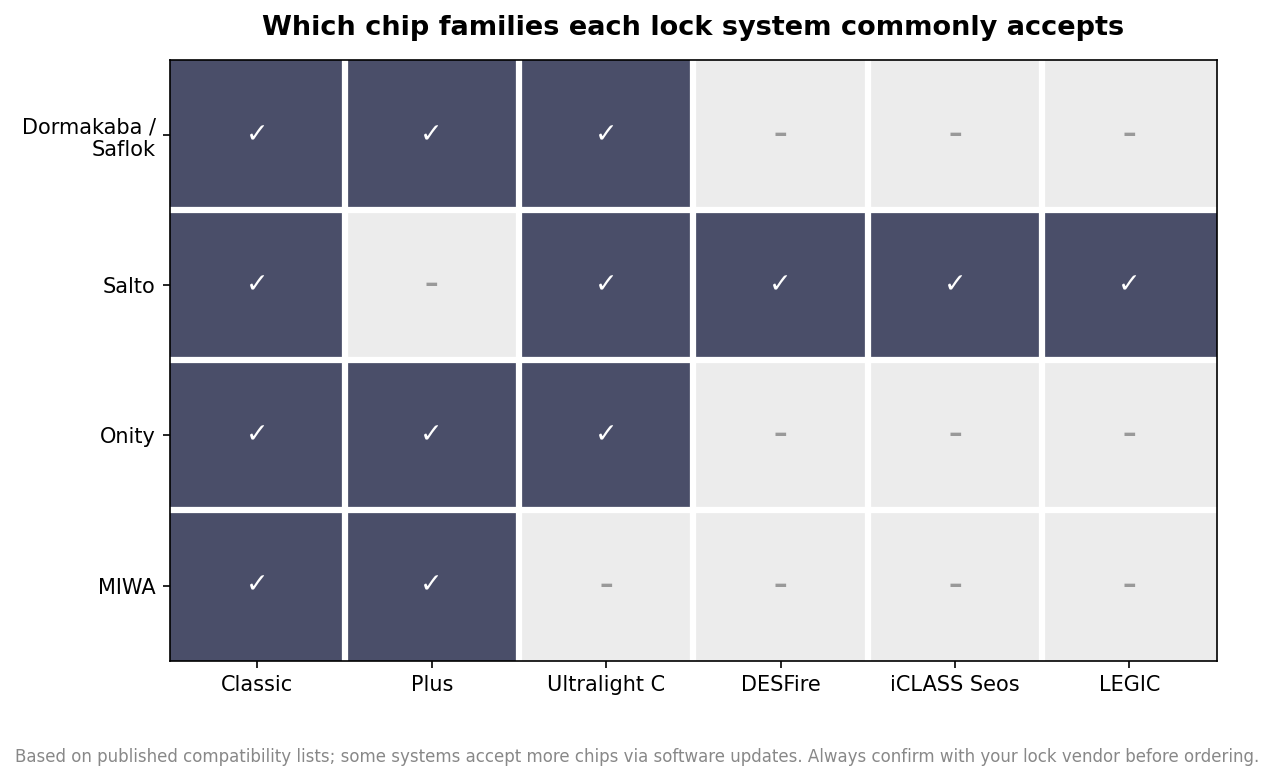
The pattern above reflects published compatibility for the major systems, and a few points are worth calling out. Dormakaba and Saflok systems lean on the MIFARE Classic and Plus families plus Ultralight C. Onity covers a similar Classic-and-Plus range. Salto is the most flexible of the group, reading DESFire as its primary credential while still supporting Classic, Ultralight C, iCLASS Seos, and LEGIC. Because manufacturers add support through software updates and regional variants, treat the chart as a starting point and confirm the exact chip and variant with your lock vendor against your installed firmware before you place the order.
Step 3: Right-size the memory and weigh security
Once you know which chips your locks accept, you often still have a choice among them, and that choice is really about memory and security rather than the room-opening function itself. A guest-room credential is tiny — a room identifier and a validity window — so raw capacity is rarely the constraint. The chart below shows how different the families are in nominal storage, but most hotels use only a small block of it.
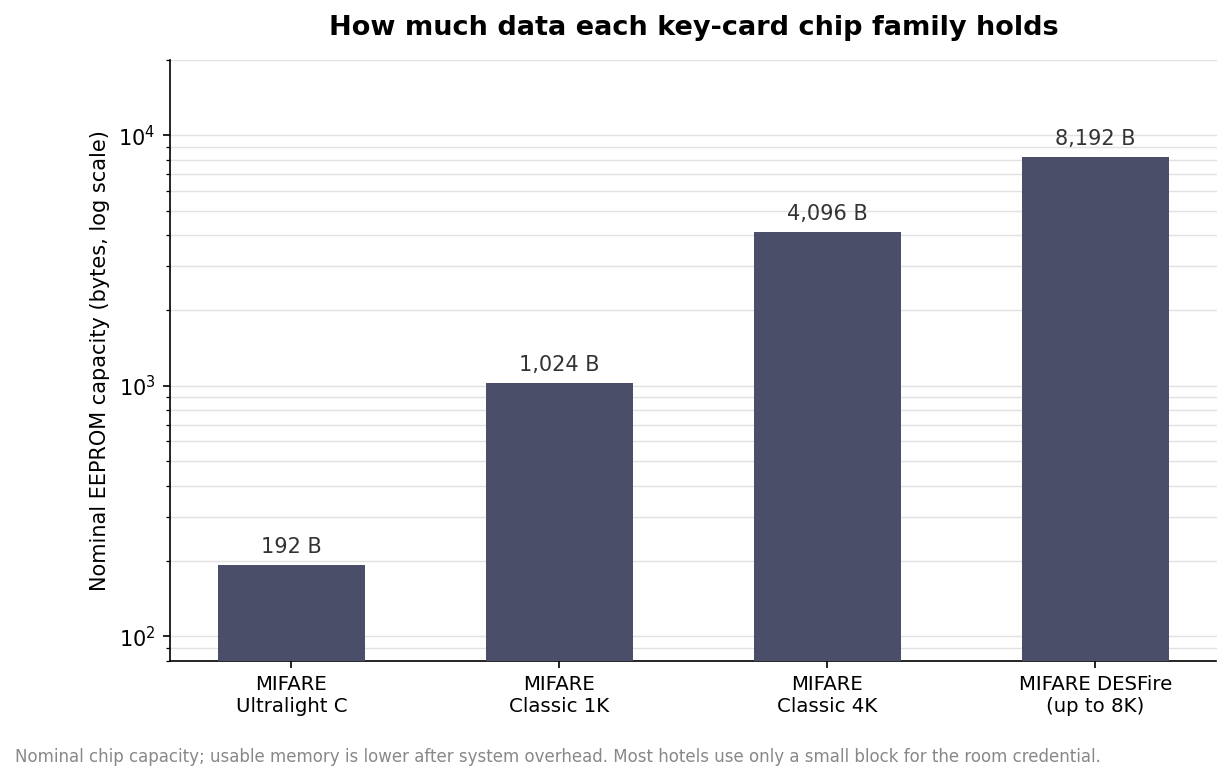
Security is the more meaningful axis. MIFARE Classic is inexpensive and ubiquitous, but its original Crypto1 cipher was broken years ago, and Classic cards can be cloned with cheap, widely available tools. For a standard-security property that reissues cards constantly, that may be an acceptable trade for the low price. For a high-end property, one where cards double as elevator or amenity credentials, or anywhere master-level access is a concern, a DESFire chip with AES encryption is far harder to duplicate and is worth the premium. MIFARE Ultralight C sits at the low-cost end and is a common pick for high-volume disposable cards on short stays. Decide security first, then price, because the cost difference per card is small next to the cost of a cloning incident.
Step 4: Blank or pre-encoded
The last decision is who writes the data to the card. In most hotels the card vendor supplies blank stock with the correct chip, and the property encodes each card at the front desk using the encoder tied to its lock software at check-in. This is what you want in nearly every case: it keeps room assignments and dates under your control, lets you reissue instantly, and means the printed card carries no guest information until your own system writes it. Pre-encoding by the vendor only makes sense for fixed-function cards, such as permanent staff or amenity credentials, and it requires sharing your system’s encoding details, so it is the exception rather than the rule.
This also settles a common worry: a standard hotel key card does not store a guest’s name, home address, or payment details. What gets written is an access credential and the dates it is valid — a pointer your lock system understands, not a personal record. The long-running rumor that key cards hold your credit card number is simply not how the systems work.
Putting the spec on your purchase order
Turn those four decisions into one clear line for your supplier and your order will not bounce back with questions. Specify the frequency (almost always 13.56 MHz), the exact chip family and variant your locks require (for example, MIFARE Classic 1K, DESFire EV3, or Ultralight C), a note that cards ship blank for on-site encoding unless you have a stated reason otherwise, and then your artwork and finish. Confirm the chip against your lock vendor’s current compatibility list one last time, order a small test quantity if the chip is new to your property, and only then run the full print. Nail the chip and the encoding, and the design is the fun part again.